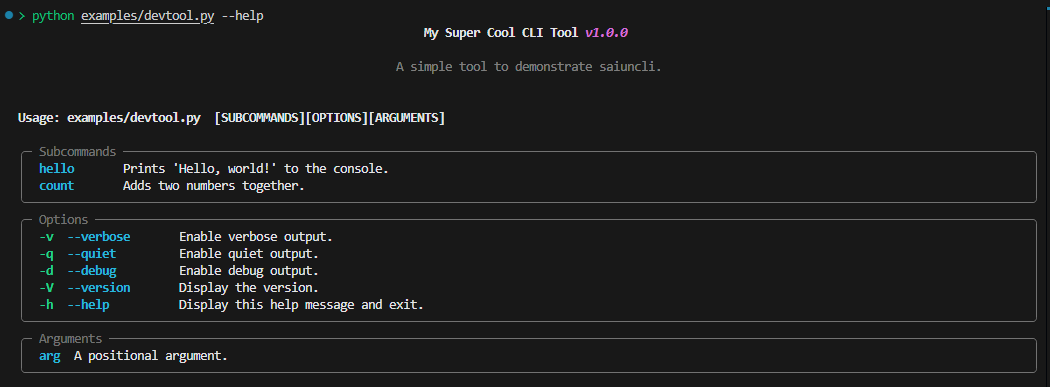
from saiuncli.cli import CLI
from saiuncli.command import Command
from saiuncli.option import Option
from saiuncli.theme import Theme
from saiuncli.console import Console

# Custom theme and console for CLI outputs
theme = Theme()
console = Console(theme=theme)

def hello_handler(name: str, count: int):
    for i in range(count):
        console.print(f"Hello, {name}!")
    console.success("Succcessfully executed handler!")


def count_handler(a: int, b: int):
    if a is None or b is None:
        raise ValueError("Both 'a' and 'b' must be provided.")
    console.print(f"{a} + {b} = {a + b}")
    console.success("Succcessfully executed handler!")


def base_handler(**args):
    console.print("Base command executed.")
    if args:
        console.print(f"{args}")

    console.success("Success Message")
    console.error("Error Message")
    console.warning("Warning Message")
    console.info("Info Message")

if __name__ == "__main__":

    # Create CLI
    mycli = CLI(
        title="My Super Cool CLI Tool",
        description="A simple tool to demonstrate saiuncli.",
        version="1.0.0",
        console=console,
        handler=base_handler, # Command Handler
        help_flags=[],
        version_flags=[],
        options=[
            Option(
                flags=["-v", "--verbose"],
                description="Enable verbose output.",
                action="store_true",
            ),
            Option(
                flags=["-q", "--quiet"],
                description="Enable quiet output.",
                action="store_true",
            ),
            Option(
                flags=["-d", "--debug"],
                description="Enable debug output.",
                action="store_true",
            ),
        ],
    )

    # Define Subcommands
    hello_command = Command(
        name="hello",
        handler=hello_handler,
        description="Prints 'Hello, world!' to the console.",
        options=[
            Option(
                flags=["-n", "--name"],
                description="The name to print.",
                type=str,
                required=True,
            ),
            Option(
                flags=["-c", "--count"],
                description="The number of times to print the name.",
                type=int,
                default=1,
            ),
        ],
    )

    count_command = Command(
        name="count",
        handler=count_handler,
        description="Adds two numbers together.",
        options=[
            Option(
                flags=["-a"],
                description="The first number.",
                type=int,
                required=True,
            ),
            Option(
                flags=["-b"],
                description="The second number.",
                type=int,
                required=True,
            ),
        ],
    )


    # Append Subcommands
    mycli.add_subcommands([hello_command, count_command])

    # Run your CLI Tool!
    mycli.run()